![[cXF] Widget Tabs](/data/resource_icons/0/644.jpg?1787473966)
- Compatible XF versions
- 2.2.x
- 2.3.x
- Visible branding
- No
Create a widget and add additional widgets inside and show them as tabs. More in screens below
Features:
DEMO on our site
How does it work?
1. Create a widget [cXF] Widgets Tabs and set a position where you would like to show it:
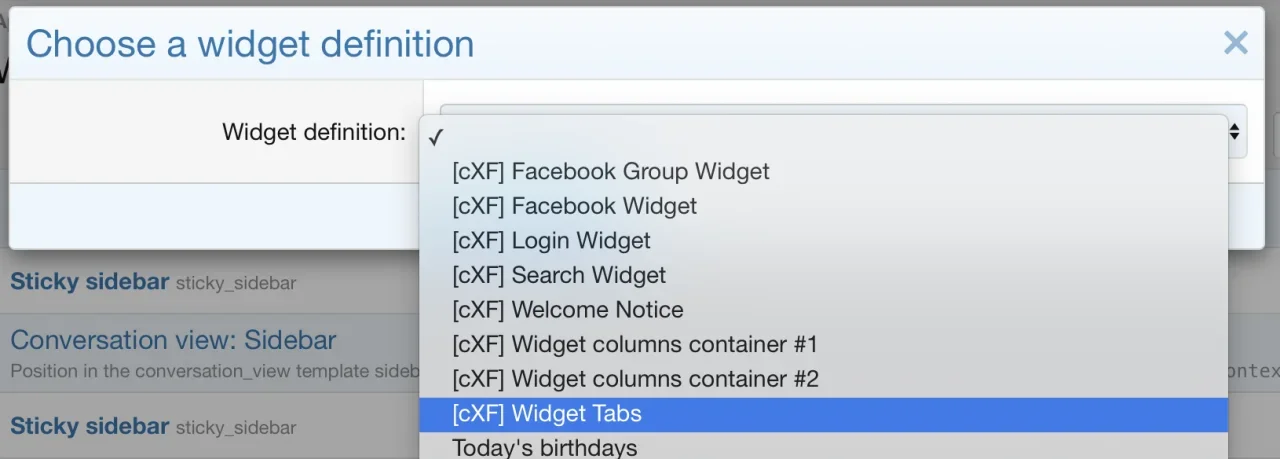
2. Create or add existing widgets and set Display positions for tabs:

3. Go to Options > [cXF] Widget Tabs and enter titles for each tab to show.
4. Go to Style properties > [cXF] Widget Tabs and check additional styling.
OPTIONAL
< hide tabs to a certain user group with permission >

Screens:
< demo widgets in tabs >

< demo widgets in tabs in sidebar >

< example of more widgets in the same tab >

< easily change tabs heading style >

< add icons to tab title >

< demo widget tabs on customizexf.com >

Features:
- create up to 8 tabs and add widgets to preset widget positions
- add an icon for widget tab title
- easy choose between two tab header styles
- show widgets title (useful if you want to have more widgets in the same tab)
- hide tabs to a certain user group with permissions
DEMO on our site
How does it work?
1. Create a widget [cXF] Widgets Tabs and set a position where you would like to show it:
2. Create or add existing widgets and set Display positions for tabs:
3. Go to Options > [cXF] Widget Tabs and enter titles for each tab to show.
4. Go to Style properties > [cXF] Widget Tabs and check additional styling.
OPTIONAL
< hide tabs to a certain user group with permission >
Screens:
< demo widgets in tabs >
< demo widgets in tabs in sidebar >
< example of more widgets in the same tab >
< easily change tabs heading style >
< add icons to tab title >
< demo widget tabs on customizexf.com >


